


Baby Sleep Sounds: White Noise
4.126.00 Reviews
App Specs
- Version
- 7.2.4
- Updated On
- License
- Free
- Downloads
- 50,000+
- Developer
- OddLabs
- Categories
- Parenting
- Platform
- Android
Screenshots
 Analysis by AppCompare
When a baby is wide awake at the exact moment everyone else is ready for bed, a simple sound can sometimes make the difference between a long evening and a calmer routine. I tried Baby Sleep Sounds: White Noise from OddLabs with that situation in mind, treating it less like a novelty soundboard and more like a small tool for the difficult handoff from feeding, rocking, or settling to actual sleep. It is a free parenting app for Android, rated for Everyone, with optional in-app purchases ranging from under a dollar to about twenty dollars per item.
My overall impression is that it works best when you use it as part of a repeatable bedtime pattern rather than expecting one sound to solve every sleep problem. The app is focused, easy to understand, and approachable for tired parents. It has also reached over fifty thousand installs and holds an average rating of 4.1 from a little over a hundred ratings, which gives it a modest but useful track record without making it seem like an established replacement for a full baby-monitoring system.
From a restless room to a repeatable bedtime routine
I find the most useful way to judge a bedtime sound app is not by whether it promises a perfect night, but by whether it makes one small part of the routine easier to repeat. A quick daytime trial can help you settle on a comfortable sound and volume before you are tired and holding a baby. That practical setup also makes it easier to see when the phone itself, rather than the audio, becomes the weak link.
The starting condition matters more than the sound
The most useful way to approach this app is to begin with the actual problem in front of you. If your baby is hungry, uncomfortable, overheated, ill, or overstimulated, background audio is not the first answer. I would deal with those needs before opening any sleep-sound app. Baby Sleep Sounds: White Noise becomes more relevant after the practical parts of the routine are handled and the room is already reasonably calm.
That distinction is important because white noise is not a sedative. It can soften sudden household sounds, make an unfamiliar room feel more consistent, and give a child a familiar cue that bedtime has started. It cannot replace feeding, a clean diaper, a safe sleep setup, or a parent’s judgement. In my experience, the app feels most useful during the final few minutes when the baby is nearly settled but still reacting to every door, footstep, or change in the room.
I also like that the app belongs clearly in the parenting category rather than pretending to be a medical or sleep-analysis product. That keeps expectations realistic. You are choosing an audio environment, not receiving a diagnosis or a personalized sleep plan. Parents who want a straightforward way to introduce steady sound will understand the purpose quickly; parents looking for sleep tracking, developmental guidance, or a complete routine planner should look elsewhere.
Setting up the first attempt
My advice is to test the app before the baby is already overtired. Open it during a quiet part of the day, explore the available sound choices, and decide which one feels least distracting to you. A sound that seems soothing for a few minutes can become irritating after a longer session, especially when you are sitting nearby in a dark room. Finding your preference in advance avoids making decisions while holding a sleepy child.
Worth Reading Before You Choose

EA SPORTS FC Mobile 26 Is a Bigger Football Game, but It Takes Time

Flipboard Shows What News Apps Must Do Beyond the Feed

Switching to Android Auto Means Rethinking Your Driving Routine

Google Calendar Makes a Crowded Week Easier to Manage

Ludo King Makes the Most of the Minutes Between Plans

Baby Panda World Brings Quick Play to Modern Phones, but Its Game Library Feels Busy
Start at a conservative volume. The phone or speaker should not be placed next to the crib, and the sound should not be used to cover crying or other signs that the baby needs attention. The goal is a gentle, stable background, not a loud wall of noise. This is one of the most important practical trade-offs: a sound that masks every little household noise may also make it harder for an adult to notice what is happening in the room.
The app runs on Android devices using version 5.0 or later, so it can be suitable for older phones that are still in service as a bedside device. That is convenient for families who do not want to dedicate their newest phone to bedtime. At the same time, an older handset may have a weaker speaker or a battery that drains quickly, so the device itself can become the limiting factor rather than the app.
A step-by-step flow that feels manageable at night
My preferred workflow is simple. I first finish the normal care routine, then open the app, choose one sound, set a low and comfortable level, and place the phone well away from the sleeping space. I let the sound begin before transferring the baby, rather than turning it on after the room has already changed. That small timing choice can make the transition feel less abrupt.
Next comes the handoff from active soothing to passive background support. While rocking or holding the baby, I keep the sound steady and avoid repeatedly changing options. Constant experimentation can create more stimulation, not less. Once the baby is settled, I leave the phone in the same general location and avoid touching it unless the volume or playback needs attention.
This is also where the app’s simplicity helps. There is not a complicated routine to configure before every use. A tired parent can make a choice and return to the child. For a bedtime tool, that matters more to me than a long list of impressive controls that require concentration at the wrong time.
A useful advanced habit is to use the same sound for several nights before judging it. Babies can respond to consistency, while adults often abandon an option too quickly because the first evening was difficult for unrelated reasons. If the room was unusually warm, the baby missed a nap, or visitors disrupted the day, the sound is not being tested under normal conditions. Repeating the same setup gives you a fairer sense of whether it helps your household.
The handoffs between people and devices
Bedtime rarely belongs to one person from beginning to end. One parent may feed the baby, another may take over rocking, and someone else may need to tidy the room or care for an older child. A sound app is helpful when the handoff does not require a full explanation. If the selected sound and volume are already familiar, the next person can continue the routine without turning bedtime into a technical task.
That makes the phone’s placement part of the workflow. If it is left on a chair, shelf, or dresser at a safe distance, another caregiver can see that the routine is active without needing to hold the device. If it is buried under blankets, carried from room to room, or left beside the crib, the process becomes less predictable and less safe. The app itself cannot solve poor placement; the household routine has to do that.
There is another handoff that is easy to overlook: the transition from app audio to ordinary household quiet. I would not treat continuous sound as mandatory for every sleep period. If the baby is already asleep and the room is naturally calm, you may prefer to stop the audio rather than keep a phone running unnecessarily. On the other hand, if outside noise is frequent, a stable background may be more useful than repeatedly starting and stopping it. The right choice depends on the room and the child, not on a claim that one method works for everyone.
For shared bedrooms, the trade-off becomes clearer. The app may help one child settle, but the sound can bother a partner, sibling, or caregiver. In that situation, a separate audio device or a more directional solution may be better. Baby Sleep Sounds: White Noise is convenient because it is already on a phone, but convenience does not guarantee that every person in the room will find the result comfortable.
What the result looks like in everyday use
A realistic example is a late afternoon nap after a noisy day. The baby has been fed and changed, the curtains are partly closed, and the parent is trying to transfer the child without restarting the whole settling process. I would begin the chosen sound before the transfer, keep the volume modest, and leave the phone at a distance. If a sibling walks through the hallway or a kitchen cupboard closes, the background may make that interruption less noticeable.
The result I would look for is not instant silence or a guaranteed longer nap. It is a smoother transition and fewer reactions to small environmental changes. Sometimes that is enough to give a parent the few minutes needed to finish another task. On a difficult night, the app may simply become one familiar part of the routine, even if the baby still needs holding or reassurance.
This is where my opinion of the app is positive but measured. It does not need to transform sleep to be worthwhile. A free tool that is quick to open and easy to repeat can earn its place if it reduces friction at the same point in the evening. The value comes from regular use and sensible expectations, not from treating the sound as a guaranteed solution.
The current version is 7.2.4, and the app’s basic positioning remains easy to understand: it is for baby sleep sounds, not a broad parenting dashboard. That narrow focus is a strength for someone who wants immediate audio without sorting through feeding logs, sleep charts, reminders, or articles. It is a weakness for anyone hoping to manage the entire bedtime process inside one application.
Where the flow breaks down
The first point of friction is that a phone is still a phone. Notifications, calls, low battery, accidental taps, and a family member needing the device can interrupt the routine. I would use a device that can remain undisturbed and check its battery before starting a long session. If your household depends on the same phone for emergency calls or work, a dedicated sound machine may be a better fit.
The second problem is sound quality. A small built-in speaker may produce a thin or harsh result, while headphones are inappropriate for a baby’s sleep environment. The app cannot improve the physical limits of the device playing it. If the sound feels grating at a low level, changing the phone’s position or using a suitable external speaker may help, but that adds equipment and another possible failure point.
Optional purchases are another consideration. The app is free to start, which makes it easy to try without committing money, but individual in-app items can cost from $0.99 to $19.99. I would explore the free experience first and only pay if a specific addition genuinely improves your routine. Parents who dislike unlocking content inside a simple utility may prefer a one-time purchase sound machine or an app with a completely open sound library.
I would also skip this app if you need reliable automation, detailed sleep records, or a system that coordinates with a smart nursery. Its strength is immediate, uncomplicated playback. Once your needs move toward schedules, monitoring, analytics, or integration with other devices, a dedicated alternative will probably be more appropriate. Likewise, if your child sleeps well in ordinary quiet, adding background sound may create an unnecessary dependency.
Safety deserves a direct mention. Keep the device out of the crib and away from the baby, use a restrained volume, and make sure the audio does not prevent you from hearing the child. The app is rated Everyone, but an age rating describes the software’s content, not the correct physical setup for using a phone around an infant. Good placement and supervision remain the parent’s responsibility.
Who will get the most from it
I think this app is a good match for new parents who want a low-effort way to make bedtime more consistent, families moving between rooms or homes, and caregivers who already use a phone as part of their evening routine. It can also help when the main challenge is unpredictable household noise rather than a child who cannot settle under any circumstances.
It is less suitable for parents who want coaching, sleep training guidance, or a record of patterns over time. It is also not my first choice for a shared room where everyone has different sound preferences, or for a nursery that needs an always-on device with its own controls and power source. In those cases, the usual alternative—a dedicated white-noise machine—can be less flexible but more dependable.
Compared with playing a random video or music track, this app feels more focused and less cluttered by unrelated entertainment. Compared with streaming audio, it avoids making bedtime depend on a service, a playlist, or a constantly changing selection. The trade-off is that a streaming service may offer broader customization, while a dedicated machine may handle overnight use more naturally. Baby Sleep Sounds: White Noise sits in the practical middle: easier than assembling a playlist, but more dependent on the phone than hardware built for this single job.
My final take after following the full routine
OddLabs has made a useful little parenting app for a specific moment: the move from an active settling routine to a calm, predictable room. I appreciate that it does not require a complicated setup, and the free entry point makes it reasonable to test before spending anything. Its best quality is not excitement; it is the way it can become a quiet, repeatable part of bedtime.
Still, I would use it with clear boundaries. Keep the volume gentle, place the phone safely away, protect the device from interruptions, and judge the result over several ordinary nights rather than one difficult evening. If you need monitoring, automation, or a device that can run without competing for your phone, choose a different option. If you simply want accessible background audio for a baby’s sleep routine, this app is worth trying.
For me, the deciding question is whether the app makes your existing routine easier. If the answer is yes, its modest focus is an advantage. If you find yourself constantly changing sounds, checking the phone, buying additions, or worrying about battery and placement, the workflow is breaking down and a dedicated alternative will serve you better. Used thoughtfully, Baby Sleep Sounds: White Noise is a practical support tool—not a replacement for attentive care, but a sensible way to make the room feel more consistent when bedtime is already underway.
Pros
- Wide range of calming sounds for naps and bedtime
- Simple controls make it easy to start a sleep session
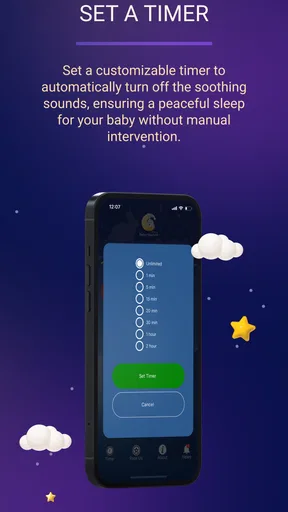
- Timer options help stop playback automatically
- Suitable for babies
- toddlers
- and adults
- Can help mask sudden household or outdoor noises
Cons
- Some sounds or features may require an in-app purchase
- Continuous audio playback can drain the device battery
- Not every baby responds positively to white noise
- Loud volume may be unsafe without careful supervision
- Limited value if your child already sleeps well without sound
FAQs for Baby Sleep Sounds: White Noise
What is Baby Sleep Sounds: White Noise, and how does it help babies sleep?
Baby Sleep Sounds: White Noise is designed to play calming background audio that may help babies relax, settle down, and fall asleep more easily. It typically includes sounds such as white noise, gentle rain, fans, nature ambience, or lullabies. The steady audio can mask sudden household noises, although every baby reacts differently and the app should be used as a sleep aid rather than a guaranteed solution.
Is Baby Sleep Sounds: White Noise safe to use overnight?
The app can generally be used during naps or bedtime, but safe setup is important. Keep the phone or speaker away from the baby’s crib, avoid placing any device inside the sleeping area, and use a comfortable volume rather than playing sounds loudly. It is also sensible to use a timer when possible. Parents should follow safe-sleep recommendations and consult a pediatrician if they have concerns.
Does the app work without an internet connection?
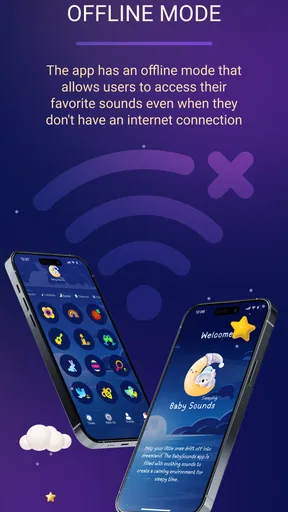
Offline availability depends on how the application handles its sound library and whether tracks have been downloaded or stored on the device. Some sounds may play immediately after installation, while others can require streaming or additional downloads. Before relying on the app during travel or bedtime, test it with Wi-Fi and mobile data disabled. This also helps avoid unexpected data usage or interruptions.
What sounds and customization options are available in the app?
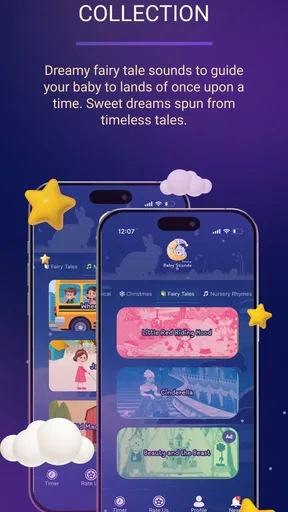
The app commonly offers several categories of relaxing audio, including white noise, fan sounds, rainfall, nature ambience, soft melodies, and lullabies. Depending on the version, users may be able to adjust volume, combine sounds, select a playback duration, or enable looping. Exploring the library is worthwhile because some babies prefer consistent noise, while others respond better to softer musical or natural sounds.
Is Baby Sleep Sounds: White Noise free to download, and does it contain ads or purchases?
The application may be available as a free download, but its exact business model can vary by platform and version. Free editions may include advertising, locked sound collections, premium features, or optional in-app purchases. Check the Google Play Store or Apple App Store listing before downloading to review current pricing, subscriptions, permissions, and refund information. Also verify that any purchase is intentional, especially if children use the device.


